
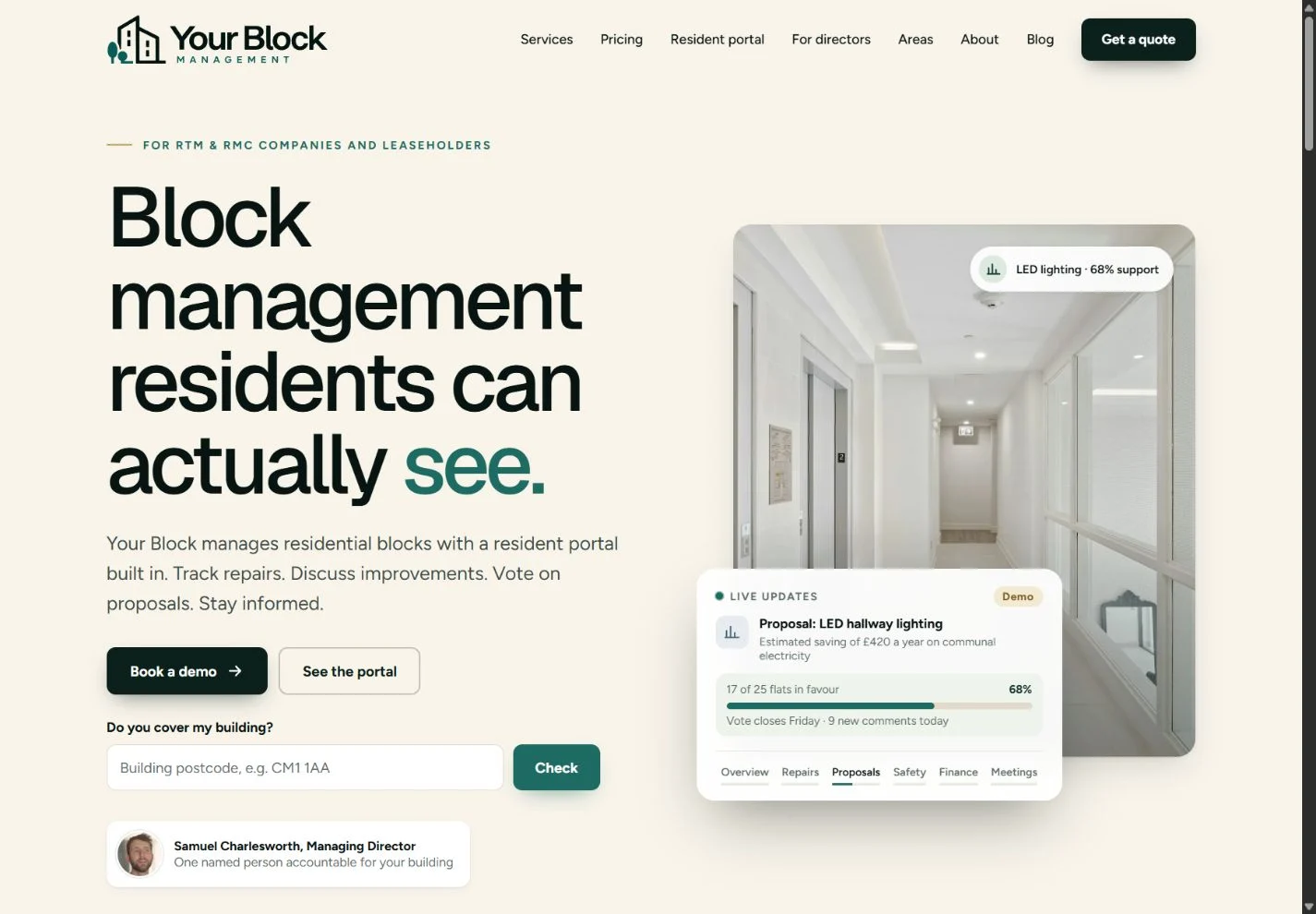
A property management website has several audiences to look after. A resident wants to know what is happening in their building. A director needs to understand responsibilities and costs. Someone comparing managing agents wants a clear explanation of the service before making an enquiry.
For the launch of Your Block Management, we designed the website and provided the client portal, bringing those different needs into one connected experience. The project combines a public introduction to the business with practical tools: interactive pricing, service information and a visible explanation of how the resident portal works.
The next stage will bring video into that experience, starting with a brand introduction film and a portal induction and demonstration video. First, here is a closer look at the website we have created.
01 / The first impression
A clear introduction to a complex service.
Block management covers plenty of work that residents may only notice when something needs attention: communal repairs, contractor visits, budgets, documents and meetings. The homepage gives those activities a recognisable shape, using examples of everyday building life alongside the message “Block management residents can actually see”.
Warm backgrounds, deep green panels and spacious typography give the information room to breathe. The design leads visitors towards two useful next steps: exploring the portal or discussing their building. A postcode coverage checker provides another practical starting point.
02 / Pricing you can explore
Move the slider. See the difference.
The interactive block management pricing calculator is one of the strongest parts of the site. Visitors can choose their location, adjust the number of flats with a slider or enter an exact figure, and indicate whether their building has a lift.
The result changes on the page, showing the annual management fee for the building alongside annual and monthly figures per flat. That gives visitors more than one way to understand the same price, without needing to complete an enquiry form first.
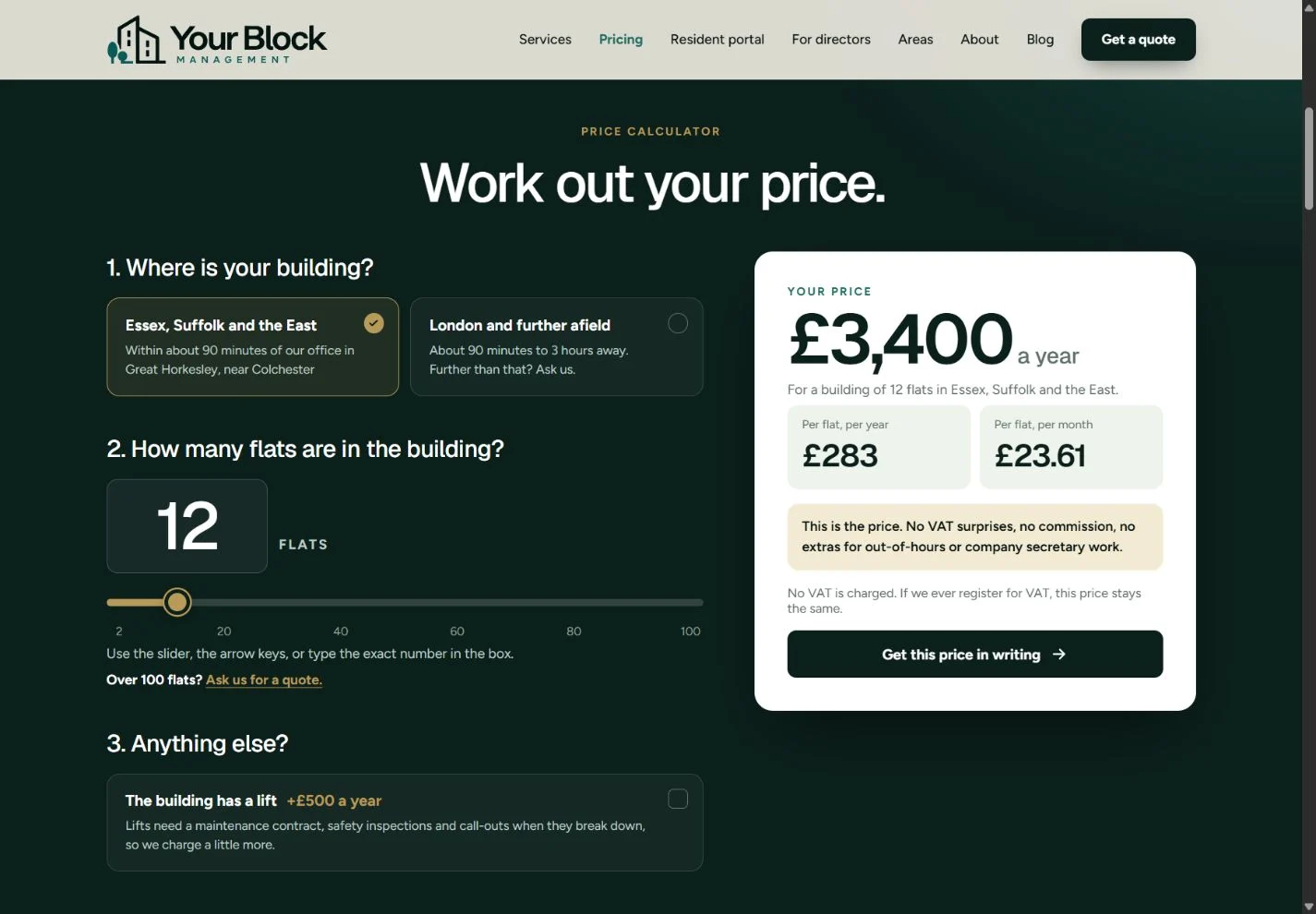
Just as useful is the information around the calculator. The page explains what the management fee includes, sets out other fees and identifies building types that need an individual quote. The figure shown is the management fee, rather than a promise to cover every cost of running a building.
That balance matters in website design. An interactive tool should make a decision easier to understand, with enough context to explain the answer it produces. Here, visitors can explore a scenario, read the scope and then request the price in writing.
03 / The client portal
A place to follow what happens next.
The client portal is a central part of the project. Its purpose is to give residents and directors a clearer view of their building, with the relevant updates and records brought together. The public resident portal overview introduces that experience through a demonstration building.
Repair reporting is a good example. The website shows the journey from a resident raising an issue through to a contractor being assigned, a visit being booked and the work being signed off. A visible sequence makes the service easier to picture than a general statement about communication.
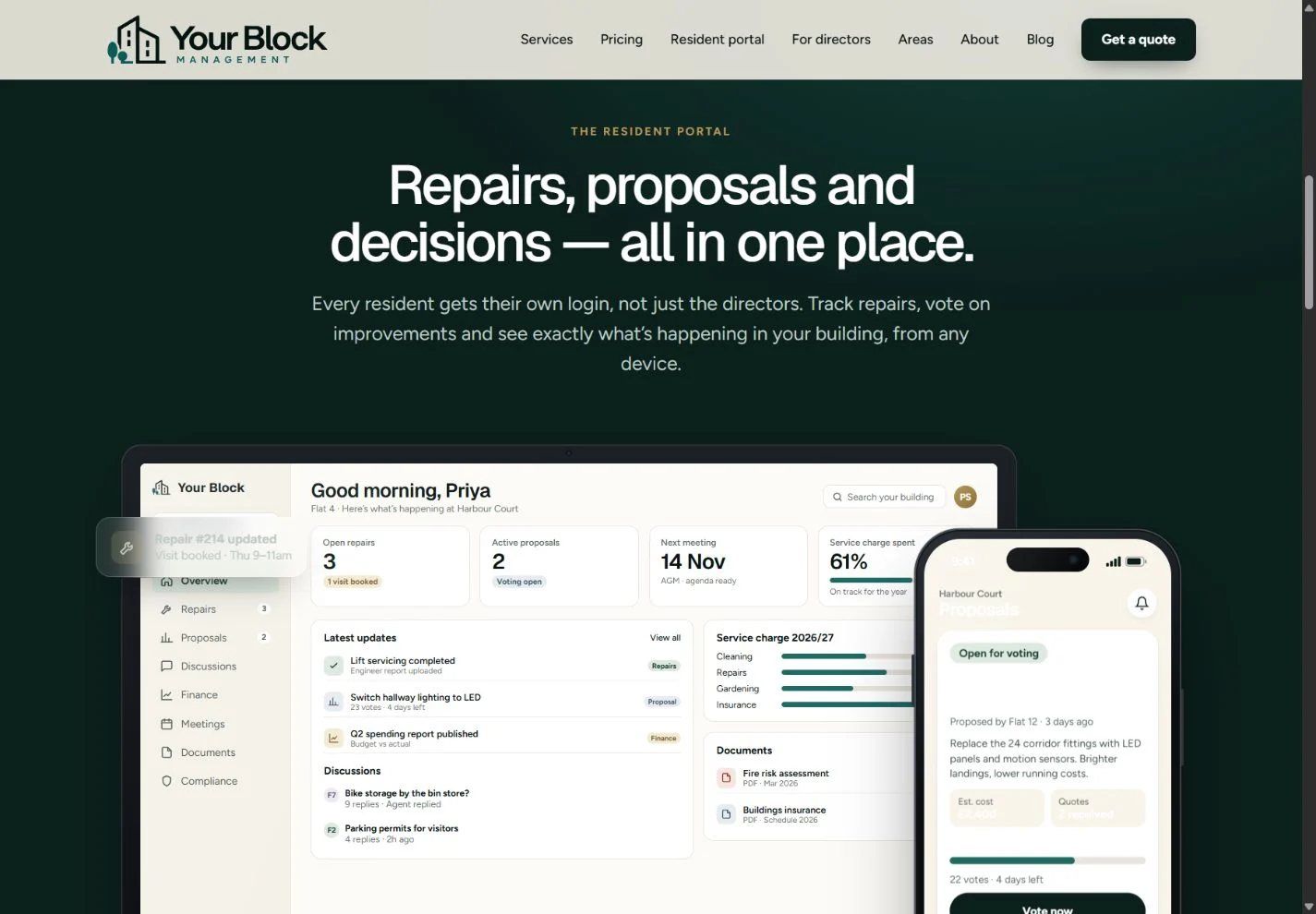
Other examples introduce proposals, resident discussions, informal polls, documents and spending information. These are different tasks, but they share a design principle: people should be able to find the current position and understand what they are looking at.
The website also distinguishes between resident participation and the work of the board. Informal polls can gather views; they are presented separately from formal director decisions. Giving those audiences appropriate explanations is part of making the wider service understandable.
04 / Pages with a purpose
Useful routes through the website.
The homepage introduces the offer, while the supporting pages give visitors somewhere specific to go with their next question. Each part has its own job:
What does management include?
The block management services page explains areas such as repairs, maintenance, budgeting, insurance, meetings and contractor management. It gives readers a fuller picture of the work behind the headline service.
What do directors need to see?
The information for RTM and RMC directors focuses on the board’s perspective, including repairs, spending, approvals and compliance dates. It speaks to people helping run their building alongside their other commitments.
Is the service available here?
The coverage and location pages help visitors explore the business’s service area across London, the East and South East. They work alongside the homepage postcode checker and the location choices in the pricing tool.
Who is behind the business?
The About page introduces the people and approach, while the FAQ and blog provide room for further explanation. The contact page gives visitors a route to a portal demo or a written proposal, depending on what they need next.
What this project says about a useful website.
A launch is a chance to think about how all the pieces fit together. Someone who discovers a business through its homepage should be able to follow the same ideas into its services, pricing and day-to-day experience.
For Your Block Management, that thread is visibility. The website introduces it, the calculator makes the management fee tangible, and the portal demonstrations show what access to updates and records can look like. The design uses specific examples to explain the offer before asking visitors to take the next step.
It is an approach that also informs our corporate video production: start with what the audience needs to understand, then choose the clearest way to show it. A website and a film have different strengths, but they can work towards the same purpose.
05 / Coming next
Bringing the website to life with video.
We will be providing video production for Your Block Management’s website next. The first planned films cover both the introduction to the business and the practical experience of using the portal.
Planned / 01
A brand introduction film
A chance to introduce the people, purpose and approach behind Your Block Management. Our brand film production will help give the website a human introduction alongside its written information.
Planned / 02
A portal induction and demonstration
A practical walkthrough to help users become familiar with the portal and its key tasks. This is where training and induction video production can complement on-screen guidance with a clear sequence people can revisit.
Next / 03
More content as the service develops
Further website video content will follow as the priorities take shape. The aim is to build useful material around the questions residents, directors and prospective clients actually have.
Explore the new website.
You can explore the design, try the pricing calculator and see the public portal demonstrations on the Your Block Management website.
If you are planning a website launch and want the design and video content to work together, talk to The Camera Guys about your project.
Website screenshots captured in November 2026. Portal examples use the public site’s demonstration content. The brand introduction and portal films described above are upcoming work.