
How to Fix Drone Not Working Problems Before You Bin It
If you’re searching for how to fix drone not working problems, start with the simple things: fully charge every battery, update the firmware on the drone, controller and app, re-pair the controller, and calibrate the compass and IMU. Those steps fix most “dead” drones we come across. Only once they’ve failed is it time to think about a repair centre, and binning it should be the very last option.
We fly drones for a living, covering events, property and surveys, so we’ve met most of the common faults in the field. This guide works through them in the order we’d check them, from the quick fixes to the signs that something is broken.
How to fix drone not working problems: start with the symptom
“My drone isn’t working” can mean a dozen different faults. Pin down the symptom before you start pressing buttons, because each one points somewhere different.
| Symptom | Most likely cause | Where to start |
|---|---|---|
| Nothing happens when you press the power button | Flat or sleeping battery, or a battery not seated properly | Charge it fully and reseat it |
| Drone powers on but won’t connect to the controller | Pairing lost, or firmware out of step | Re-link the controller, then update everything |
| Motors won’t start | Safety warning, sensor error or restricted airspace | Read the warning in the app |
| Drone drifts, circles or won’t hold position | Compass interference or IMU needing calibration | Move away from metal and calibrate |
| Wobbly flight or vibration in the footage | Damaged propellers or a struggling motor | Inspect and replace the props |
| Camera or gimbal error | Gimbal cover left on, or gimbal blocked | Remove the clamp and restart |
Drone won’t turn on? Check the battery first
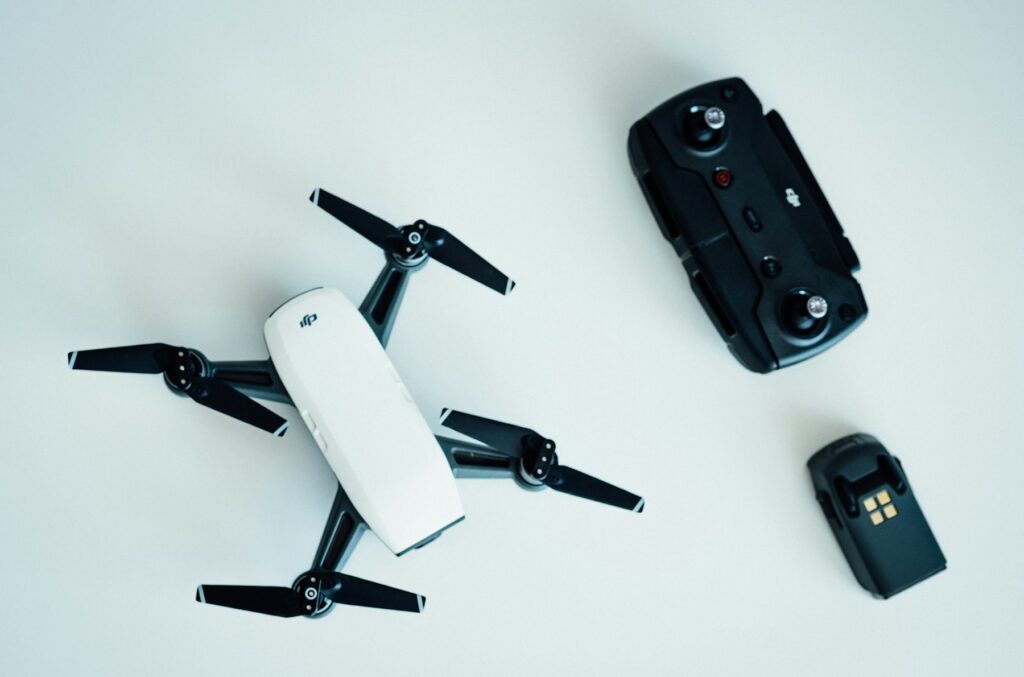
A drone that does nothing at all is usually a battery problem rather than a broken drone.
- Charge it properly. Smart batteries that have been left flat for a long time can drop into a deep sleep to protect themselves. Leave the battery on the original charger for a good while before you decide it’s dead. Many will wake up.
- Reseat it. Take the battery out, check the contacts for dirt or bent pins, and push it back in until it clicks. A battery that isn’t fully latched may not power the drone, and it can come loose in flight.
- Try another battery. If a second battery works, you’ve found your fault. Retire the faulty one.
- Look for swelling. A puffed-up, swollen or damaged lithium battery should never be charged or flown again. Dispose of it safely at a battery recycling point.
- Warm it up in winter. Lithium batteries lose power in the cold, and some drones won’t take off until the battery is warm enough. Keep batteries indoors or in an inside pocket until you fly, and check the operating temperature range in your manual.
Drone won’t connect to the controller
This is one of the most common faults, especially after a drone has sat in a cupboard for months.
- Restart in the right order. Turn everything off. Turn the controller on first, then the drone, then open the app.
- Re-link the controller. Most drones have a linking or pairing option in the app or a pairing button on the drone. Follow the steps in your model’s manual.
- Update the firmware. If the drone, controller and batteries are on different firmware versions, they can refuse to connect or throw errors. Connect to wi-fi and let the app update everything, one device at a time, without turning anything off mid-update.
- Check the phone and cable. If you use your phone as the screen, try a different cable, close other apps, and check the drone app has the permissions it needs (location in particular).
- Move away from interference. Wi-fi routers, other drones and dense buildings can all upset the connection.
The motors won’t start or the drone won’t take off
Modern drones refuse to take off when something looks unsafe, and that’s a good thing. The app almost always tells you why, so read the message rather than tapping it away.
Common reasons for a no-go
- Compass or IMU error: the drone doesn’t trust its own sensors. See the calibration steps below.
- Weak GPS: wait a minute or two in an open area for more satellites, especially if you’ve travelled a long way since your last flight.
- Restricted airspace: near airports and some other sites, the app may block take-off. Check the zone on an official UK drone map such as Drone Assist. If you’re in a flight restriction zone, you need permission from the airport before you fly.
- Low or cold battery: some drones won’t launch below a certain charge or temperature.
- Uneven take-off surface: long grass, a slope or a soft surface can confuse the sensors. Use a landing pad.
- Gimbal clamp still fitted: leave the transport cover on and many drones will report a gimbal error and refuse to fly.
How to calibrate the compass and IMU
Calibration fixes a large share of “won’t take off”, drifting and erratic flight problems. The exact menu varies by model and app, so follow your manual, but the process is broadly the same.
Compass calibration
- Move to an open space, well away from cars, metal fences, reinforced concrete, power lines and phone masts. Take off any metal watch or bracelet.
- Open the compass calibration option in your app.
- Rotate the drone horizontally through a full turn, then hold it nose-down (or nose-up, as instructed) and turn it again.
- Wait for the app to confirm success. If it keeps failing, move somewhere else and try again. Car parks and urban spots often cause interference.
Calibrate when the app asks you to, when you fly somewhere new and far from home, or if the drone starts flying in slow circles (pilots call this “toilet bowling”).
IMU calibration
- Charge the battery to at least half.
- Place the drone on a flat, level, solid surface indoors or out, away from metal and electronics. Fold or remove the propellers so it sits flat in every position.
- Start IMU calibration in the app and place the drone in each position it asks for, keeping it perfectly still until each step completes.
- Let the drone restart when it’s finished.

Drone flies badly, wobbles or vibrates
- Check the propellers. Chips, cracks and bends cause vibration, jelly-like footage and wobbly flight. Props are cheap, so replace any that are damaged, and always replace them in matched sets on the correct motors.
- Spin each motor by hand. It should turn smoothly and freely. Grinding, grit or a gritty feel usually means sand or debris inside, which is common after a landing on a beach.
- Look for damage after a crash. Cracked arms, a loose motor mount or a knocked gimbal won’t always be obvious. If the drone flew badly straight after a knock, assume something is damaged.
- Clean the sensors. Dirty obstacle-avoidance and downward sensors can make a drone hesitant or unstable at low height. Wipe them gently with a lens cloth.
When to stop and get it repaired
Some faults aren’t worth fixing at home, and a few are a safety risk if you try.
- Calibration fails again and again in different, clean locations (the sensor itself may be faulty).
- A motor won’t spin, stutters or gets very hot.
- The drone has been in water.
- The gimbal is physically damaged or the camera won’t show a picture after a restart.
- The battery is swollen, cracked or won’t hold charge.
Check whether your drone is still under warranty or covered by a manufacturer care plan before paying for a third-party repair. Opening the drone yourself can void the warranty. And whatever you fix, do a short, low hover test in an open space before you trust it for a real flight.
Don’t forget the paperwork
If your drone has been gathering dust, your registration may be out of date too. Since 1 January 2026, the UK needs a Flyer ID for drones of 100g or more, and an Operator ID if the drone has a camera, so even many small drones now need both. Check your CAA registration before your first flight back.
Need aerial footage without the faff?
Getting a hobby drone working again is satisfying, but if you need reliable aerial footage for a business, an event or a property, it can be quicker to book a team that flies professionally. We’re fully insured (£10m public liability) and fly across Suffolk, Essex and the surrounding counties. See our aerial filming, event drone coverage and property drone coverage pages, or read when aerial footage is worth using. Then get in touch about your project.
Frequently asked questions
Why won’t my drone turn on even after charging?
The battery may be in deep sleep after being left flat, or not seated properly. Leave it on the original charger for longer, reseat it firmly, and try a second battery to rule out the drone itself.
How do I reset my drone?
Most drone apps offer a reset to factory settings or a firmware refresh. Try a restart, re-link and firmware update first, as a full reset clears your settings.
Why does my drone drift or circle on its own?
Usually compass interference or a sensor that needs calibrating. Move away from metal, calibrate the compass and IMU, and check the propellers for damage.
Is it worth repairing an old drone?
Often yes, if the fault is a battery, props or a calibration issue. If it needs a new motor, gimbal or main board, compare the repair quote with the cost of a newer model, which may also have better safety features.